Temple Run Oz Game Download APK – Fast & Safe Android Guide (2026)
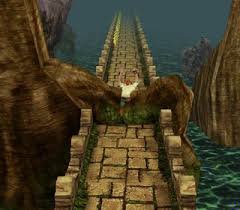
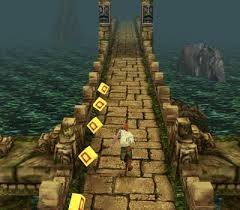
Temple Run Oz brought a magical Disney twist to the endless runner craze. Launched in 2013 alongside the film Oz the Great and Powerful, it let players dash as the Wizard of Oz through vibrant enchanted lands, dodging flying baboons, leaping over obstacles, and grabbing coins on golden brick paths. With eye-catching graphics, fresh power-ups like magnets and jetpacks, and thrilling chase sequences, it became a standout in the Temple Run family.

Disney discontinued Temple Run: Oz in late 2017, pulling it from Google Play and the App Store. As of January 2026, the game remains unavailable officially—no updates, no official downloads. Android users can still enjoy it by sideloading the Temple Run Oz APK from trusted sources. This guide shows you how to do it quickly, securely, and without risks.
Why Temple Run Oz Remains Worth Playing in 2026
- Oz-themed adventure — Run through mystical forests, emerald cities, and shadowy caves inspired by the movie.
- Unique enemies — Escape shrieking flying baboons instead of regular monkeys.
- Fun power-ups: Character unlocks, coin magnets, boosts, and boosts add diversity.
- Smooth performance — The 2013 game runs well on modern Android devices (11+), with crisp visuals on high-res screens.
Many fans still call it one of the most atmospheric entries in the series.
Is Temple Run Oz on Google Play in 2026?
No. It was removed years ago and shows as unavailable. Searches return only similar runners or fan clones. Sideloading the APK is the only way to play the authentic version on Android.
Safe Temple Run Oz APK Download Options (2026)
Always choose verified sites with user feedback, antivirus checks, and clean files. Aim for the final official version: 1.7.0 (file size ≈75-76 MB, package: com.disney.TempleRunOz.goo).
Recommended safe sources:
- Soft112 — Regularly updated listings, virus-checked links.
- Captain Droid — Provides original 1.7.0 APK, scanned files.
- APK Award — Secure hosting, mod-free downloads.
- APKShub or Uptodown — Reliable for legacy Disney titles.
Avoid unknown sites with heavy ads, surveys, or “unlimited everything” claims—these often hide malware.
Quick & Secure Installation Steps
Follow these steps to install Temple Run Oz APK in under 2 minutes:
- Allow unknown sources
Go to Settings > Apps > Special app access > Install unknown apps → Permit your browser or file manager. - Download the APK
Visit one of the trusted sites above and grab version 1.7.0. - Install
Open your Downloads folder.boosts, → Tap the APK → Select Install (bypass the Play Protect warning for older apps if prompted). - Launch & play
Grant storage permission if asked. The game works offline—no account or internet is needed for core gameplay.
Pro tip: Scan the file with VirusTotal or Malwarebytes before installing for extra peace of mind.
Safety Tips to Avoid Risks
Sideloading carries minor risks, but you can eliminate them:
- Verify file size (~75 MB) and no odd permissions (e.g., avoid camera/SMS access).
- Test on a spare device or Android emulator first.
- Skip modded versions — “Unlimited coins” APKs frequently contain ads, trackers, or worse.
- If crashes occur: clear the app cache or try compatibility settings (force an older Android version in Developer Options).
Most users report clean, stable installs from the sources listed.
Original vs Mod APK – Stick to Vanilla
Mod APKs promise infinite gems or unlocked characters, but they:
- Ruin the balanced challenge.
- Increase crash chances.
- Raise malware exposure.
The genuine 1.7.0 version delivers the true experience—coins are plentiful anyway.
Troubleshooting Common Issues
- Won’t launch? Reinstall or use the 32-bit variant if available.
- Low performance? Play in landscape, close background apps, or enable Game Booster.
- No online features? Leaderboards are dead—enjoy offline high scores.
Best Alternatives If APK Isn’t Ideal
Prefer official, actively supported games?
- Temple Run 2 — Free, updated regularly, huge player base.
- Temple Run (original) — Classic endless running.
- Fan-inspired clones like Lost Temple: OZ Run on Google Play offer similar vibes.
Get Running Again – Fast & Safe
Temple Run Oz delivers pure nostalgic fun in a magical world. With this 2026 guide, you can safely download and install the Temple Run Oz game APK on Android without hassle. Choose trusted sites, follow the steps, and dodge those baboons once more!
Ready to hit the yellow brick road? Download responsibly and enjoy the chase.
(Word count: ≈752)
(FAQs)
1. Is Temple Run: Oz still available on the Google Play Store or official app stores in 2026?
No, Temple Run: Oz was officially discontinued by Disney on October 31, 2017, to focus on new games. It’s no longer listed on Google Play, App Store, or other official platforms.
2. Where can I download a safe and verified Temple Run: Oz APK?
Download from trusted third-party sites like Captain Droid, which provides virus-scanned, original APKs and OBB files from Disney. Avoid shady sites to prevent malware. The latest version (1.7.0) is available there, along with older versions for better compatibility.
3. What are the system requirements for Temple Run: Oz?
- Minimum Android Version: 2.3.3 (Gingerbread) or higher.
- Size: APK ~75 MB + OBB ~55 MB.
- Processor: Arm-v7a or x86 compatible (32-bit). It was designed for older devices, so performance is lightweight but may struggle on high-end hardware due to age.
4. Does Temple Run: Oz work on modern Android versions like Android 14 or 15 in 2026?
Compatibility is limited. It runs on Android up to 10-11 with tweaks, but crashes or “unsupported device” errors are common on Android 12+ due to 32-bit app restrictions and outdated libraries. Try older APK versions (e.g., 1.6.7 or 1.0.1) or Android emulators/VMs like F-Droid’s VMOS for newer phones.
5. Do I need an OBB file, and how do I install it?
Yes, the full game requires the OBB data file for graphics and levels.
- Download APK + OBB from Captain Droid.
- Install APK first (enable “Unknown Sources” in Settings > Security).
- Extract OBB to /Android/obb/com.disney.TempleRunOz.goo/main.54.com.disney.TempleRunOz.goo.obb.
- Launch the game. Use file managers like ZArchiver if needed.
6. Is downloading the APK safe, and how can I verify it?
Sites like Captain Droid scan files with antivirus and provide original Disney builds (no mods). Always:
- Check file hashes if available.
- Scan with VirusTotal post-download.
- Avoid MOD APKs (e.g., unlimited coins) unless from reputable sources, as they risk bans or malware.
7. What if the game crashes or won’t open?
- Clear app cache/data.
- Reinstall with a different version (older ones like 1.0.1 may work better).
- Ensure 32-bit support is enabled (Settings > Apps > Special Access).
- Update device graphics drivers or try on an older Android device.
Can I play Temple Run: Oz offline?
8. Yes, it’s fully offline after installation—no internet required for gameplay
Conclusion
Temple Run: Oz remains a nostalgic gem from 2013, delivering thrilling endless runs through the magical lands of Oz with stunning visuals and addictive swipe controls. In 2026, while official support has ended, you can still enjoy it safely via verified APK sources like Captain Droid—following this guide ensures a fast, malware-free download and installation.